


01 / Custom software
Software that fits your organisation.
Custom software brings processes, systems and information together in one solution that works the way your organisation works.
02 / The right choice first
Not every problem calls for custom work.
Custom software can solve a lot, but it is not automatically the best choice. Sometimes existing software is good enough, a process needs simplifying first, or two systems can work together better with an integration. That is why we first look at which route makes sense.
Configure existing software better
The capabilities are already there, but are not yet used well or do not fit the way of working closely enough.
Simplify processes
Not every manual step needs to be automated. Sometimes it first needs to be clear why that step exists.
Connect systems
A targeted API integration can solve double entry and manual handovers without building a whole new system.
Develop custom software
Custom work makes sense when the process, the service or the proposition is important enough and existing solutions consistently fall short.
So we do not automatically advise rebuilding. We look for the smallest solution that solves the problem for the long term.
03 / When custom work makes sense
Do you recognise these situations?
Staff work with makeshift solutions
Spreadsheets, separate forms, emails and manual checks have gradually grown into a business-critical process.
Data is entered several times
Information is copied manually between systems, which wastes time and causes errors.
Off-the-shelf software dictates the way of working
Your organisation has to adapt to the limitations of the package, while the process in question is actually important or distinctive.
Clients or staff lack an environment of their own
Information, documents, requests and actions run through different channels because one clear digital environment is missing.
Managing takes too much time
Reports are put together manually and up-to-date information is spread across systems, files and departments.
A digital idea does not fit existing software
You want to develop your own service, platform or SaaS product for which no suitable off-the-shelf product exists.
One makeshift solution need not be a reason to build custom software. But when workarounds become permanent, grow and slow down an important process, a serious business case emerges.

Not sure whether custom work is the right route?
Not every software question calls for a custom solution. Sometimes an integration, a process change or smarter use of existing software is wiser. We are happy to think it through critically with you.
04 / Possible solutions
What do you want to improve with software?
Automate recurring work
Less manual work, faster processes and fewer errors.Let checks, handovers, notifications and other fixed process steps run automatically.
Examples: approval processes, automatic document generation, alerts, task allocation and data processing.
Serve clients and staff digitally
Better service and less scattered communication.Bring information, documents, requests and actions together in a personal environment.
Examples: customer portals, employee portals, member areas and self-service platforms.
Develop a digital product
A digital proposition rather than just a concept.Turn a new proposition into a product that can be tested, used and expanded further.
Examples: SaaS platforms, marketplaces, subscription services and industry-specific software.
Connect systems and data
Information flows through without manual steps in between.Let existing systems exchange information automatically and avoid double entry.
Examples: API integrations with CRM, ERP, HR, finance and planning systems.
Make data usable
Current information and one shared source for decisions.Bring together information from different sources and turn it into operational and strategic insights.
Examples: Power BI, management dashboards, data platforms and automated reporting.
Support staff better
One working environment, more control over the process.Bring daily work, information and internal processes together in software that fits the way your organisation works.
Examples: planning software, case management, administrative applications, workflow software and internal registration systems.
05 / From bottleneck to business case
Custom work must demonstrably improve something.
The question is not how much functionality we can build, but what the software actually makes better.
Desired improvement
- Information is available immediately
- Systems exchange data automatically
- Clients sort things out themselves
- Up-to-date information is in one central place
- The process can grow without the same extra effort
Current situation
- Staff search and check manually
- Data is entered several times
- Clients have to email or call
- Reports are put together manually
- Growth brings more and more administrative work
We determine in advance which improvements are important enough to justify the investment.
06 / The process first
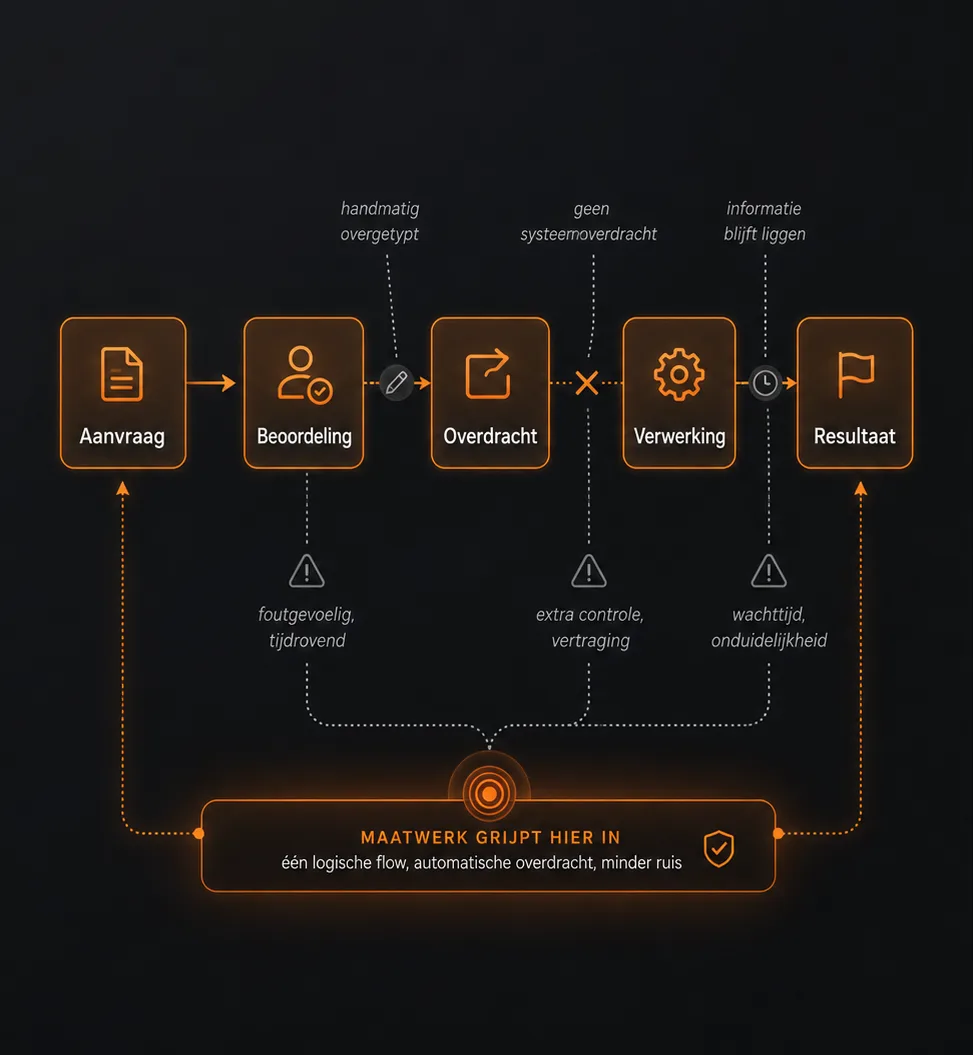
Do not automate unnecessary complexity.
An unclear process does not automatically get better by building software around it. That is why we first look at which steps add value, where information is handed over and which exceptions really need to be supported.
Sometimes this means we build less than originally thought. That is not a missed opportunity, but a better investment.
07 / From analysis to working software
Start with what delivers value first.
We first get a sharp picture of the problem and the desired improvement. Then we build a first usable version in a focused way, which can be tested in practice and developed further.
- Step 1
Understand
We examine processes, users, systems and bottlenecks.
- Step 2
Prioritise
We determine which parts deliver demonstrable value first.
- Step 3
Design
We translate the way of working into screens, interactions and technical choices.
- Step 4
Build and integrate
We develop the first usable version and connect existing systems where needed.
- Step 5
Roll out and improve
We test with users, process the findings and decide on the next step.
08 / Collaboration
You build software together with the people who do the work.
You do not need to supply a technical specification. We do need access to the people who understand how the process really works.
| Your organisation | TokoWorks |
|---|---|
| Provides process and user knowledge | Investigates the question |
| Makes the relevant staff available | Advises on the solution direction |
| Reviews choices and gives feedback | Designs and develops the software |
| Sets priorities and takes decisions | Safeguards the technology and coherence |
| Supports acceptance within the organisation | Tests and guides the implementation |
09 / Technical foundation
Built to become part of your organisation.
Custom software often ends up in important day-to-day processes. That is why we look not only at functionality, but also at continuity, security and maintainability.
- Users, roles and permissions
- Secure processing and storage
- Logging of important actions
- Monitoring and error handling
- Backups and recovery options
- stable integrations with existing systems
- Maintainable technical structure
- Automated testing where appropriate
- room for new users, processes and functionality
We map requirements around privacy, accessibility, information security and retention periods separately for each solution.
10 / Technical and product experience
Experience that goes beyond a single discipline.
We have worked on business-critical platforms, web applications, integrations, websites and digital products. From product strategy and design to development, implementation, management and further development. That is why we look not only at what needs to be built, but also at users, processes, adoption and the organisation around it.

11 / Built in practice
From digital idea to scalable platform.
MotorToko supports different users, companies and administrators within one multilingual environment. The platform combines accounts, roles and permissions, extensive search and filter options, reusable content, dashboards and support for seven languages.
12 / When we are a good fit
An honest choice before we start.
Custom work is not always the best choice. Below you can see when it pays off, and when another route is wiser.
Custom work probably fits when:
- the problem is structural and important enough;
- existing solutions demonstrably fall short;
- staff or clients benefit from it every day;
- the solution improves a process, a service or a revenue model;
- your organisation is willing to make time and decision-making power available for the substance;
- there is room to keep learning after the first version.
Another route probably fits better when:
- an existing package fits almost completely;
- the process is still changing constantly and without clear direction;
- the need consists only of a long list of desired features;
- nobody in-house is available for explanation, feedback and decision-making;
- no clear problem or desired improvement can be named.

Start with the question, not with the quote.
You do not need a fully worked-out plan or technical document yet. In a first conversation we discuss where things are getting stuck now, who is affected and what demonstrably needs to improve.
Then we advise which first step fits:
- a short exploration of the process and problem;
- research into existing software;
- a technical feasibility analysis;
- a prototype or solution direction;
- a first, clearly scoped development phase.
13 / Before you start on custom software development
Good to know about custom software.
From costs and lead time to ownership and maintenance: below you can read what to expect before we develop software together.
When is custom work better than off-the-shelf software?
Custom work becomes interesting when an important process, service or digital product consistently does not fit well within existing software. We always first look at whether better configuration, integration or buying in is the wiser option.
Do all requirements have to be fully worked out in advance?
No. We start with the problem, the users and the desired improvement. We then work out functionality and priorities step by step.
What does custom software cost?
An integration between two systems is something very different from a customer portal with ten integrations. A starting price therefore says little.
What we do instead: we split the project into phases, each with a fixed price agreed in advance. The first phase is small: we map your process and the desired improvement. After that you know what the first working version will cost, before you decide whether to continue. The first conversation is no obligation.
You're a small team. What if someone drops out?
You work with our core team. For larger assignments, we scale up quickly with a network of 10 to 15 experienced developers, product owners and data engineers whom we know personally. We record code, documentation and knowledge, so the work never depends on one person and can always be handed over.
How long does development take?
A targeted integration or dashboard requires something different from a complete SaaS platform. After the first analysis we give a realistic schedule for the first usable version and further development.
Can you integrate with our existing systems?
In many cases, yes, provided the systems in question offer a usable API or another reliable way to exchange data. We check in advance which data is available and which limitations apply.
Can you further develop existing software?
That depends on the technology used, the quality of the codebase and the documentation available. We can first assess the existing environment technically before advising on further development, modernisation or replacement.
Who owns the software and data?
Agreements on intellectual property, rights of use, source code and handover are set down in advance. Your organisation's data remains your organisation's.
What happens after go-live?
We can stay involved with hosting, monitoring, technical maintenance, support and new functionality. We agree the form and intensity of that collaboration in advance.
Can we start with an MVP?
Yes, provided the first version is usable on its own and can test a clear part of the business case. An MVP is not an unfinished end product, but a focused first version.